CANVA MEDIA KIT ALTERNATIVE
A Canva media kit alternative with stats that stay up to date
Skip static Canva templates. CreatorsJet builds a live, mobile-responsive media kit with automatically updated stats and built-in deal tracking.
Two good tools. Different priorities.
Choose Canva for templates, graphics and visual design. Choose CreatorsJet for a dedicated media kit with social stats, collaboration offers and a contact form for brands.
Canva may be a better fit if…
- You want to design a custom PDF layout.
- You create social graphics and marketing materials.
CreatorsJet may be a better fit if…
- You want one media kit link to pitch brands.
- You want to find sponsors and track brand deals.
CreatorsJet vs Canva
Comparison based on what creators need to pitch brands and land deals.
| Feature | Canva | CreatorsJet |
|---|---|---|
| Platform focus | templates, graphics and visual design | Media kits & brand deals |
| Social stats in your kit | Add your figures to the design | Profile stats via handle or social integrations |
| Getting your media kit ready | Choose a template and edit its content | Auto-generated with simple customization |
| Sharing with brands | Share your design or export a file | A dedicated public media kit link |
| Media kit PDF export | Yes | Yes |
| Brand inquiries | Add contact details or a contact link | Built-in contact form & deal tracking |
| Updating an exported PDF | Edit and export a new file | Export again, or share your live kit |
| Primary strength | Flexible template-based design | Media kits for pitching brands |
When to use each tool
- Use Canva to create your visual assets.
- Use CreatorsJet to present your work to brands.
Give brands everything they need to choose you.
Explore media kit examples →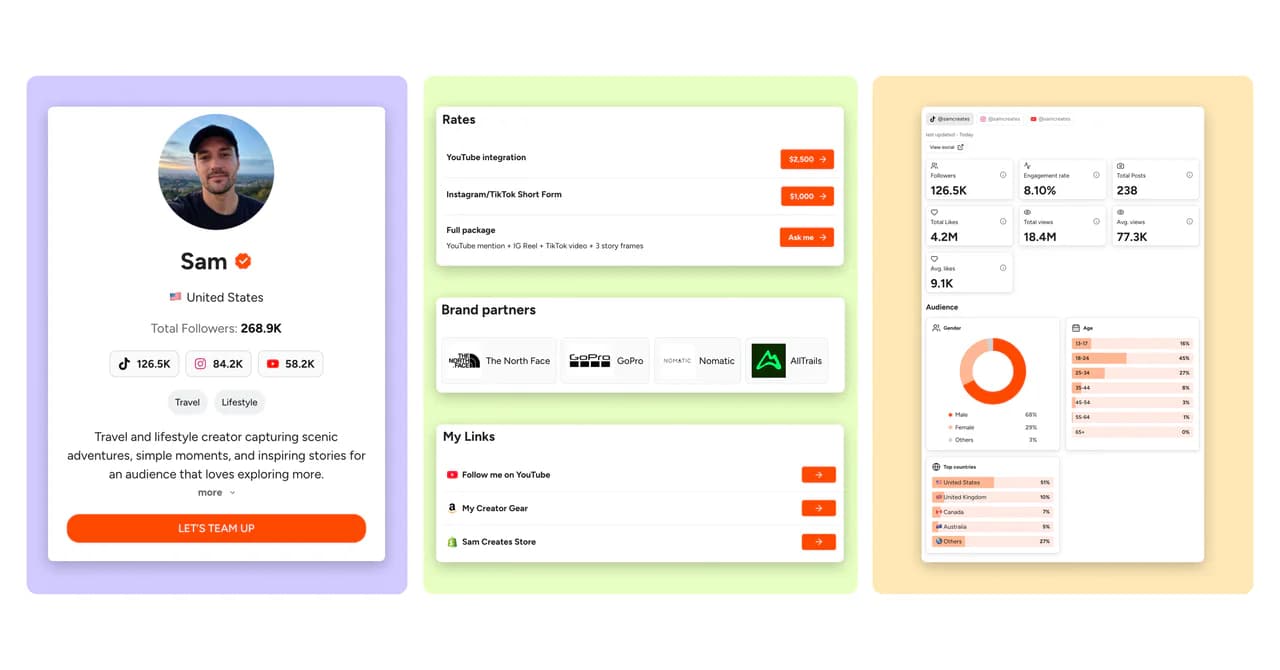
What a CreatorsJet media kit page includes
Bio & contact form
Introduce yourself and let brands reach you through a built-in contact form.
Video pitch
Introduce yourself on video and show brands what makes you a great fit.
Stats & audience
Show your social performance and who your content reaches.
Rate cards
Present your rates, packages and deliverables clearly.
Brand partners
Showcase the brands you’ve worked with.
Links hub
Bring your website and other important links together.
Highlighted posts
Spotlight the content you want brands to see first.
Case studies
Share the story and results behind your collaborations.
Top & recent posts
Show your best-performing content alongside your latest posts.
Custom theme
Personalize your media kit’s look to match your style.
Questions before you choose?
Can I make a media kit in Canva?
Yes. Canva offers media kit templates that you design by hand, so you type in your follower counts and engagement and update them yourself whenever they change. CreatorsJet is a Canva media kit alternative that builds your kit from your social handle, keeps stats updated and gives you a link and a PDF to send brands.
What’s the difference between CreatorsJet and Canva?
Canva is designed for templates, graphics and visual design. CreatorsJet is a dedicated creator media kit tool that brings your social stats, rates, past work and brand inquiries into one shareable page. CreatorsJet hosts your media kit online and gives you a shareable link to send brands; you do not need to arrange separate web hosting.
Can I use Canva and CreatorsJet together?
Yes. Use Canva to design graphics and CreatorsJet to share your media kit with brands. Add your visual assets as images or link to your published work from your kit.
How do I create a media kit with CreatorsJet?
Enter your social handle in the form to start creating your CreatorsJet media kit. Review your profile and stats, then personalize your bio, rates, brand partners and content before sharing your link with brands.
Is CreatorsJet free to use?
Yes. CreatorsJet has a Free creator plan with one social account, and no credit card is required to get started. On Pro, you can fully white-label your media kit and use your own domain, so the page and its link feel like an extension of your brand. Find Sponsors and agency products have separate plans.
Does CreatorsJet update media kit stats automatically?
Yes. CreatorsJet offers daily media kit stats updates on Starter and Pro. You can add supported profiles using a handle or social integration; available metrics depend on the platform and connection. Daily updates are not included in Free.
Can I import my Canva media kit into CreatorsJet?
There is no automatic Canva import. Start with your social handle, then add your bio, rates and past work. You can reuse your own images and link to existing work before sharing your new media kit.



